How to improve your Supabase database health with MCP
How to
September 11, 2026
6 min read
Intended first value
Get a scored, prioritized Supabase health assessment from a single prompt, and let your agent fix the top issues directly.
A Supabase project accumulates health debt quietly: a table exposed through the Data API without a policy, a foreign key that never got an index, an error rate nobody is watching. Dreambase runs a Supabase Health Assessment that scores all of it, and with the Dreambase MCP your AI agent can run that assessment, turn the results into an infographic, and then fix the highest-priority findings directly in your database.
This guide walks through the setup once, then gives you a single prompt you can reuse every time you want a fresh assessment.
What you need
A Dreambase workspace with a Supabase project connected. See Onboarding and Supabase Authentication if you have not connected one yet.
An AI tool that supports MCP: Claude Code, Claude, Cursor, Codex, or ChatGPT.
Optional: the Supabase MCP server installed in the same tool, so the agent can apply fixes after it reads the report.
Step 1: Install the Dreambase MCP and skills
The prompt below depends on two things: the Dreambase MCP server, which exposes the health report tools, and three Dreambase Skills that teach the agent how to turn the report into an infographic. The plugin installs both in one step.
Install the Dreambase Plugin (recommended)
In Claude Code, register the Dreambase marketplace and install the plugin. Run both commands.
/plugin marketplace add DreambaseAI/skills
/plugin install dreambase@dreambase
Restart the session, then authenticate the MCP server:
/mcp
Select dreambase, choose Authenticate, and sign in with Dreambase in the browser window that opens. Cursor, Codex, and ChatGPT install the same plugin from their own marketplaces; the Dreambase Plugin doc has each client's steps.
Or set it up manually
If you prefer not to use the plugin, add the remote MCP server directly. In Claude Code:
claude mcp add --transport http dreambase https://app.dreambase.com/mcp
Every other client uses the same remote URL, https://app.dreambase.com/mcp, with OAuth sign-in. The Official Dreambase MCP doc has click-by-click instructions for ChatGPT, Claude, Codex, and Cursor.
Then install the skills the prompt references:
npx skills add DreambaseAI/skills --skill dreambase-mcp --skill dreambase-echarts --skill dreambase-visualization-design --skill dreambase-data-stories
Verify the connection
Ask your agent to call whoami and then list_workspaces. If both succeed and you see your workspace, the MCP is authorized and scoped correctly. If create_health_report is missing from the tool list, reconnect: existing tokens do not gain newly introduced scopes automatically.
Step 2 (optional): Install the Supabase MCP so fixes can be applied
The Dreambase MCP reads your project and never writes to it. To let the agent apply the recommendations, install the Supabase MCP server in the same tool and scope it to the project you are assessing. Skip read-only mode if you want the agent to run the fixes, and keep manual review of tool calls on. Supabase recommends trying this on a development project or branch before production.
Step 3: Run the health assessment prompt
Paste this into a new chat or session. Mention the Dreambase MCP by name so the agent routes to the right tools.
Using the @Dreambase mcp scan my database and create_health_report using /dreambase-echarts with /dreambase-visualization-design best practices strictly following /dreambase-data-stories to create an infographic to tell the story of our database health with stats for total users, tables, rls coverage, storage, and review performance, indexing, security, advisors, data api, and give recommendations on high priority fixes
Here is what happens behind the prompt:
The agent calls
list_workspacesandlist_connectionsto find your Supabase project.It calls
create_health_report, which returns immediately with a report id, then pollsget_health_reportuntil the scan completes. A full scan usually takes a minute or two.The
dreambase-data-storiesskill shapes the narrative,dreambase-visualization-designchooses each chart, anddreambase-echartsbuilds and validates the rendered configs.You get an infographic that tells the story of your database: totals for users, tables, RLS coverage, and storage, then a section each for performance, indexing, security, advisors, and the Data API, closing with the high-priority fixes.
What you get
Two artifacts come out of one prompt.
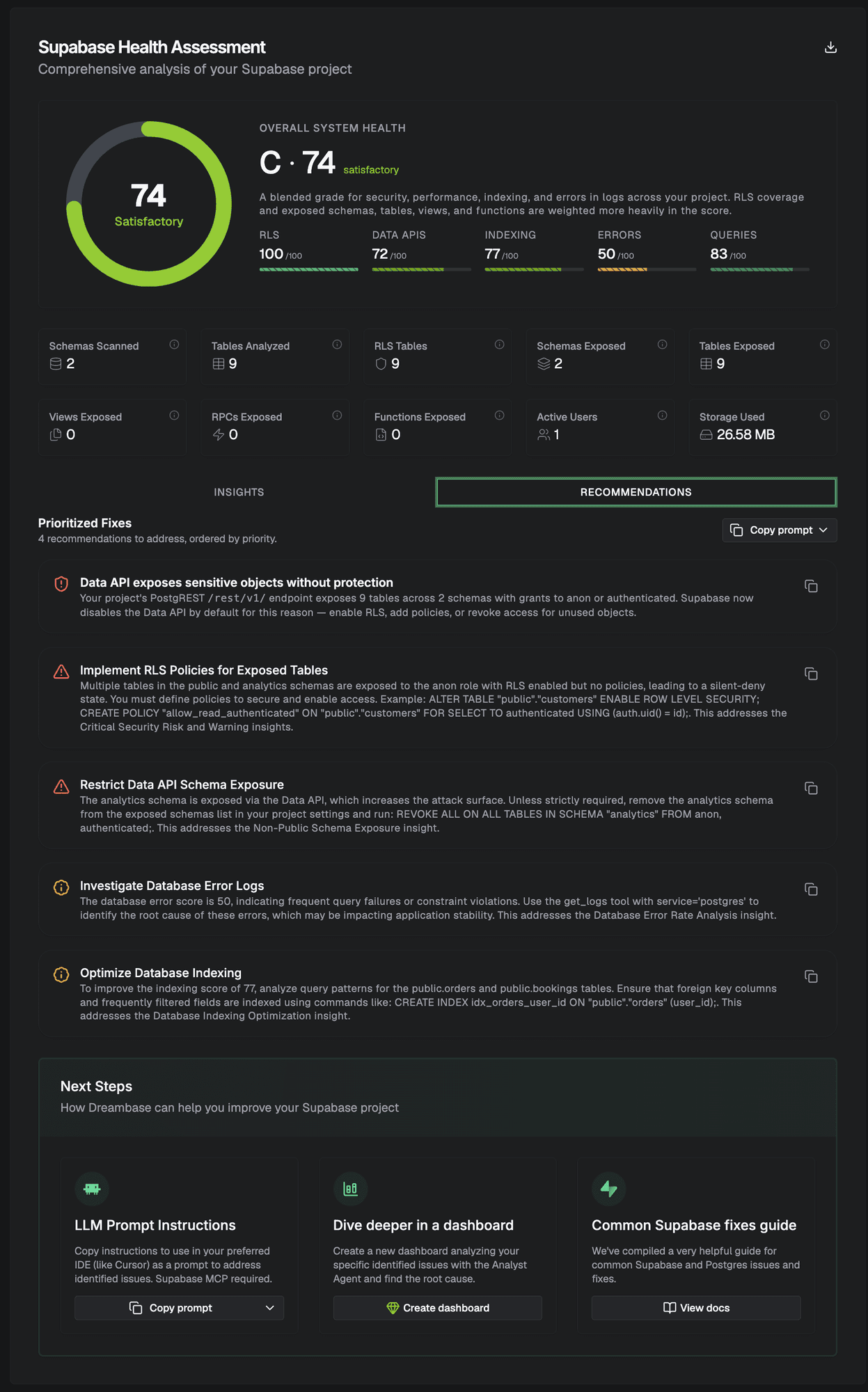
An infographic your agent produces from the report: the headline grade, the sub-scores, the counts that matter, and a ranked list of fixes with the reasoning behind each one.
An informative health assessment that your agent can act on. Every recommendation names the objects involved and, where relevant, the SQL that resolves it. With the Supabase MCP installed, the same agent can apply those fixes directly in your database.
Dreambase also stores every generated report in your workspace, so you can benchmark database health over time. Each report shows the overall grade, sub-scores for RLS, Data APIs, indexing, errors, and queries, the scanned totals, and a prioritized fix list with copyable prompts.
Step 4: Fix the high-priority items
With the Supabase MCP connected, follow up in the same conversation:
Using the Supabase MCP, apply the high-priority recommendations from the Dreambase health report we just created. Start with RLS policies on exposed tables, then missing indexes, then Data API schema exposure. Show me each SQL statement before you run it.
Review each statement before approving it. The typical order of impact is RLS on exposed tables, missing indexes on foreign keys and filter columns, restricting Data API schema exposure, and then error-log investigation. If you would rather apply changes by hand, the report's Copy prompt button on each recommendation gives you the exact instruction to paste into any tool.
For background on any individual finding, the Common Supabase Fixes guide collects Supabase and Postgres references for RLS, indexing, query performance, logging, and data lifecycle.
Step 5: Re-run and benchmark
After applying fixes, run the same prompt again. The agent creates a new report, and because Dreambase keeps every report, you can ask it to compare the two:
Using the Dreambase MCP, list_health_reports for this project and compare the two most recent: which sub-scores improved, which did not, and what should we fix next?
Over time this gives you a trend line for database health rather than a one-off audit. The Supabase Health Assessments doc explains how each score is calculated and what a good target looks like. One catch. A sub-score that's missing from a report wasn't measured on that run (it didn't score zero), and a grade of 0 means nothing was measured at all. Compare the sub-scores both reports actually have.
NEXT STEP
Fix what the report found.
Practical Supabase and Postgres references for RLS, indexing, query performance, logging, and data lifecycle.