Justin Crites
Agents
7
min read

We're a small team at Dreambase, about six people right now. That means all of us constantly switch between roles. Marketing is one of those roles, so we built an AI agent to help us run it the same way we would: data-driven, able to act, and easy for anyone on the team to pick up.
We had three constraints when we started building our marketing agent:
Data-driven by default. Our team operates data first and brings an experimental mindset to everything we do. We expect our agents to work the same way.
Safety first. The agent needs to take action, but stop at the right places so it cannot post wildly or change our messaging in one swoop.
Multiplayer friendly. We swap between roles, and each of us has a preferred agent harness. Our agents need to work asynchronously without creating a huge mess.
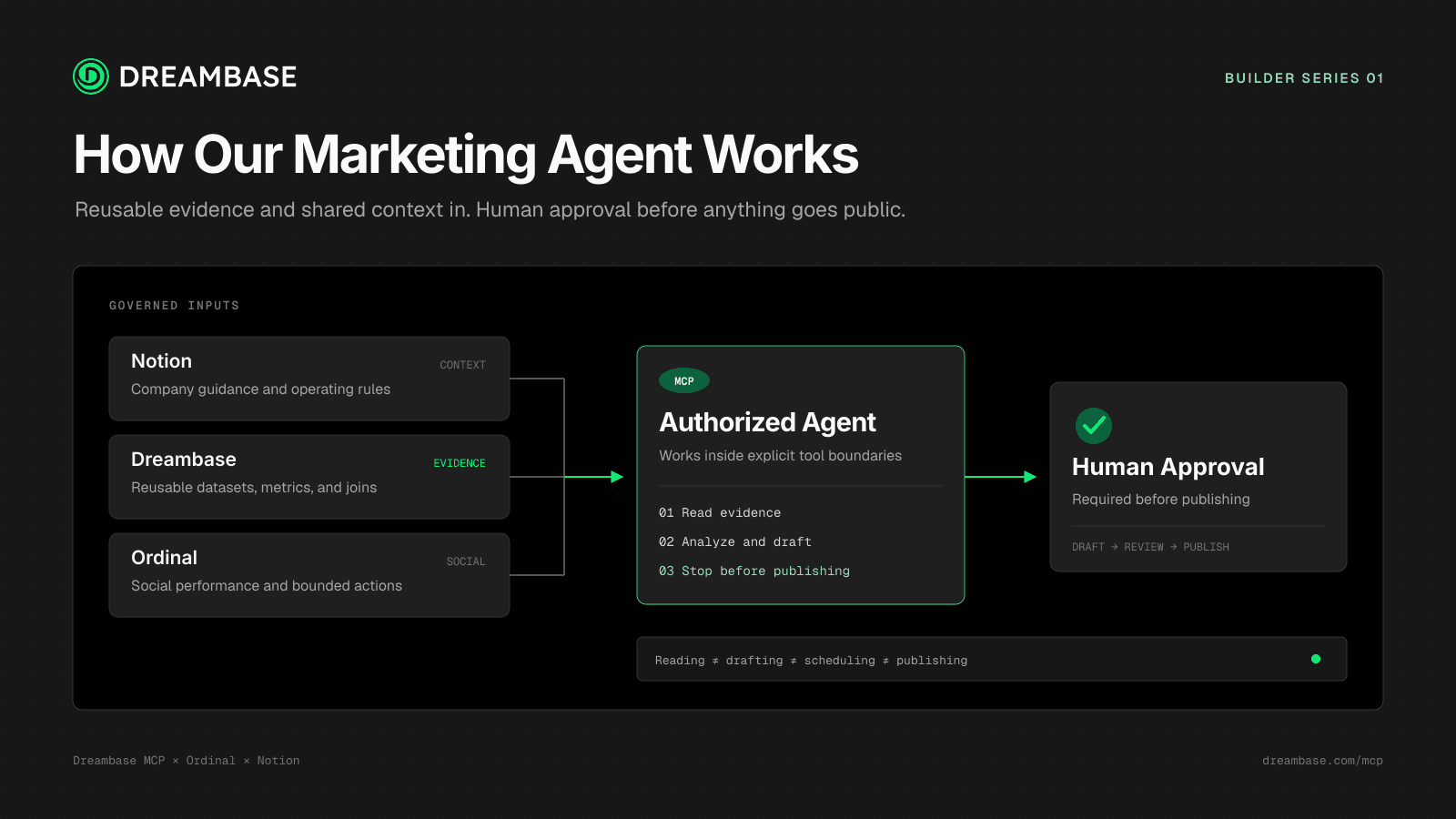
Those constraints became the structure of the system: Dreambase for reusable data, Ordinal for social data and actions, and Notion for shared company guides. MCP connects those systems to whichever agent harness a teammate prefers.
Data-driven by default
The default way to make an agent data driven is to connect raw sources through MCP or an API and let it rip. That gives the agent access to data, but not a shared definition of what the data means. A schema cannot tell the agent what Dreambase counts as a qualified visit, which events count as activation, or how one profile should be compared with another.
That is why the core primitive in Dreambase is a metric-linked dataset.
A Dreambase dataset is a reusable result backed by source logic the team can inspect. It has a known grain, source, freshness state, and access scope. The linked metric defines what counts, what gets excluded, and how the result should be interpreted.
That gives our agents:
Reliability: joins, grain, filters, and coverage do not need to be guessed again in every prompt.
Verifiability: an answer can point to the source plan, metric definition, and dataset generation that supported it.
Reusability: another authorized agent can discover the same dataset instead of rebuilding it.
Freshness: the source is queried when the dataset is created or refreshed, not for every downstream question.
Ordinal makes this useful for a real product-led growth loop. Its connector gives the operator social account and post data across our team. Dreambase can turn that into a post-level dataset with the copy, profile, network, format, publication time, impressions, engagement components, clicks where available, and performance relative to that profile's normal range.
That social data is valuable on its own, but the JOIN is the critical part. Dreambase can combine Ordinal's post and click data with product analytics, CRM, billing, or database events in the same metric-linked dataset:
Ordinal post → UTM click → qualified session → signup → activation → paid account
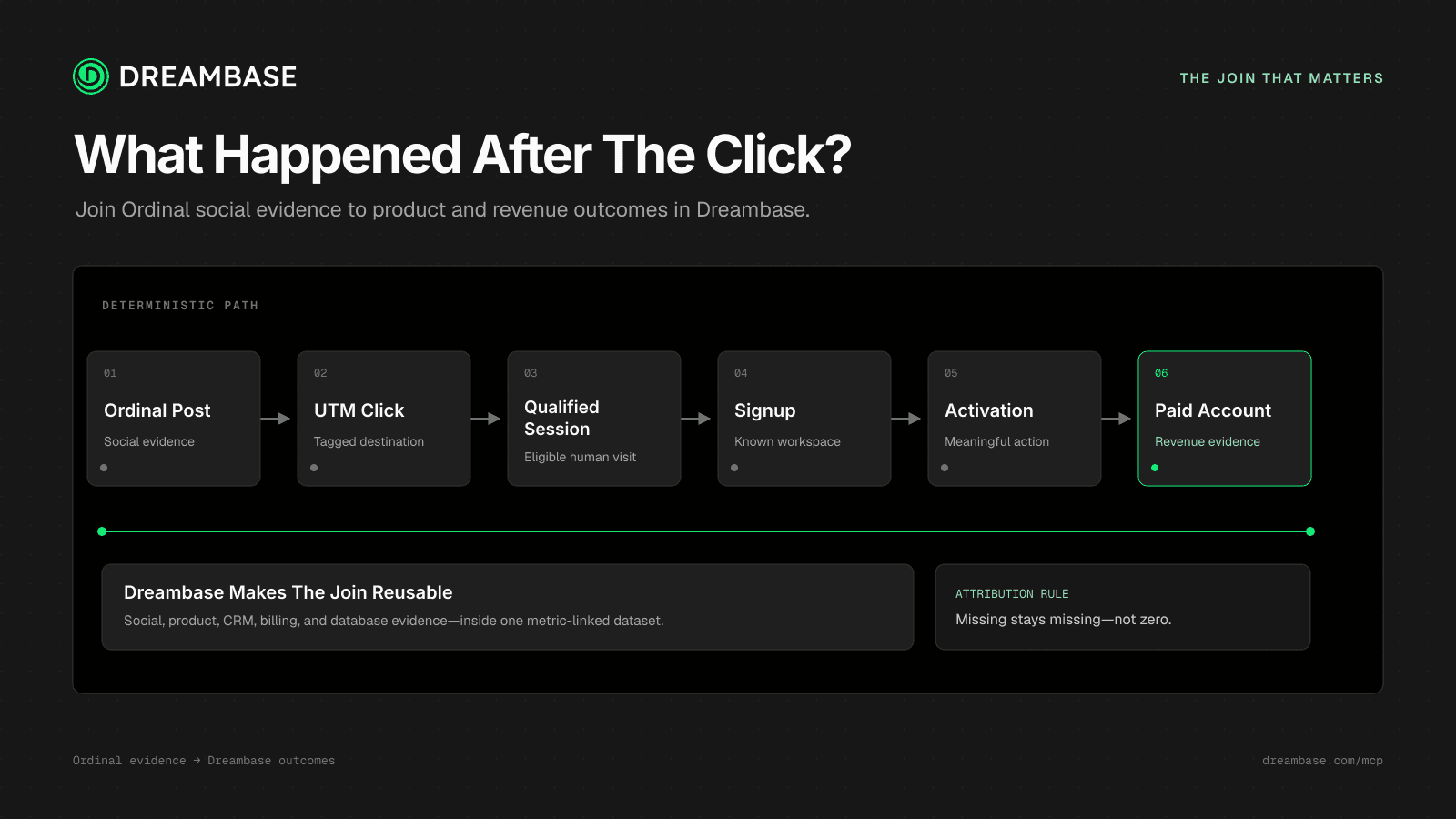
Now the operator can study hooks, claims, numbers, workflows, artifacts, and calls to action based on how they convert. When attribution coverage is incomplete, the dataset can expose that gap instead of treating missing data as zero.
In our first 30-day pass, the operator used Ordinal to analyze 83 posts across 11 Dreambase company and team profiles: 52 on X and 31 on LinkedIn. It found that technically specific, evidence-led posts with named proof correlated with stronger profile-relative engagement than generic reactions or broad questions. Now we have something to go out and test methodically.
Safety first
We want agents that can act, but not every action should have the same risk level.
The first safety boundary is between a source system and a prepared dataset. The source systems remain authoritative, and Dreambase reads them when it creates or refreshes a dataset. Agents can answer repeated questions (or perform new investigations) against that stored result through a bounded, read-only query path instead of hitting the production database, API, or MCP service every time.
The second boundary is between understanding what to do and doing it. The Ordinal plugin gives the agent social tools while letting us restrict which tools, accounts, and networks are available. An agent can read post history, compare performance, and prepare a draft without being allowed to schedule or publish it. Publishing requires separate tool access and explicit human approval.
That is the model we want across the operator:
reading data is separate from changing a source
analysis is separate from draftingi
drafting is separate from scheduling
scheduling is separate from publishing
Multiplayer friendly
An agent is not multiplayer if its memory lives inside one person's agent harness. We use Notion as the shared company-guide layer for definitions, positioning, decisions, campaign history, approval rules, and ownership. This allows agents and employees to work against the same source of company docs.
Dreambase holds the reusable analytical layer. Authorized agents can access the same datasets and metrics without receiving identical access to every source system. Marketing, product-growth, and engineering agents can use the same activation definition for different tasks.
The two systems solve different parts of the problem:
Notion explains how the company works: what we believe, what we decided, who owns it, and which rules an agent should follow.
Dreambase provides the governed evidence: the metrics, source plans, dataset generations, freshness, and queryable results behind those decisions.
MCP makes both layers available across harnesses. One teammate can start in Claude Code and another can continue in Codex or Cursor. If both load the same guide and authorized Dreambase dataset, they do not have to reconstruct the work from a transcript.
That is what multiplayer means for us: employees and agents can work asynchronously from the same company knowledge and the same governed metrics.
How Dreambase creates a dataset
For any new data need, the standard Dreambase MCP tool is plan_datasets. It is the generally available reasoning surface for turning a business question into one or more validated dataset plans.
The basic flow is:
list_connections → search_connection / get_connection → plan_datasets → save_dataset → query_dataset
The agent discovers the relevant SQL, API, or MCP sources and calls plan_datasets with two things:
the intent: what the user wants to understand, including the goal, sources, and time window;
the discovery context: the tables, columns, API endpoints, or MCP tool schemas the planner is allowed to use.
plan_datasets reasons across that context, validates the source logic, and returns one or more ready-to-save plans.
The agent reads the planner's findings before saving. They explain choices such as grain, join direction, ambiguity resolution, source limits, and whether an existing dataset already covers the request. If a business decision is still ambiguous, the planner asks instead of guessing.
Each validated plan is passed to save_dataset. That executes the source plan and persists the result as a queryable dataset. The agent then uses query_dataset to run read-only SQL against the stored result, verify the rows, and answer the question.
That is the Dreambase loop: plan against the real source, save the reusable result, and query the dataset instead of rebuilding the analysis in every agent conversation.
The tools are MCP-native, so this process does not depend on a specific Dreambase agent or a specific harness.
FAQ
What is plan_datasets in Dreambase MCP?
plan_datasets is Dreambase's standard, generally available reasoning tool for a new data need. It takes the user's intent and discovered source context, validates the required SQL, API, or MCP logic, and returns one or more dataset plans that an agent can pass to save_dataset.
How does an AI agent create a dataset with Dreambase?
The agent discovers the relevant connections and schema, calls plan_datasets, reads its findings, saves each validated plan with save_dataset, and checks the stored result with query_dataset.
Can an agent query Dreambase without hitting the production database every time?
Yes. Dreambase reads the source when it creates or refreshes a dataset. Authorized agents can then use query_dataset to run read-only queries against the stored result instead of sending every analytical question back to the production source.
What do you want to know from your data?
Get the answer now.